


Opening a physical art toy boutique is a dream for many collectors. You design the perfect neon-lit display walls, you source premium wholesale inventory from คิดัลท์ส์บ็อกซ์, and the customers start pouring in. But behind the cash register, a logistical nightmare is brewing: How do you track the inventory of a product that is literally designed to be a mystery?
Standard Point of Sale (POS) systems are built for coffee shops and clothing boutiques. They expect a 1-to-1 relationship between a barcode and a product. The Art Toy industry shatters this logic. A single shipment of Pop Mart Labubu involves Master Cartons, End Boxes (Full Cases), individual Blind Boxes, and eventually, “Confirmed” open figures that sell for wildly different prices. If your POS system cannot handle Parent-Child SKU fractionalization, your inventory count will be destroyed by week two.
This comprehensive B2B technical guide will break down the specific inventory challenges of a blind box retail store, compare the top POS systems on the market (Shopify, Square, and Lightspeed), and provide exact operational workflows for tracking “Secret” figures and open-box merchandise without losing your mind.
1. The “Russian Nesting Doll” Inventory Problem
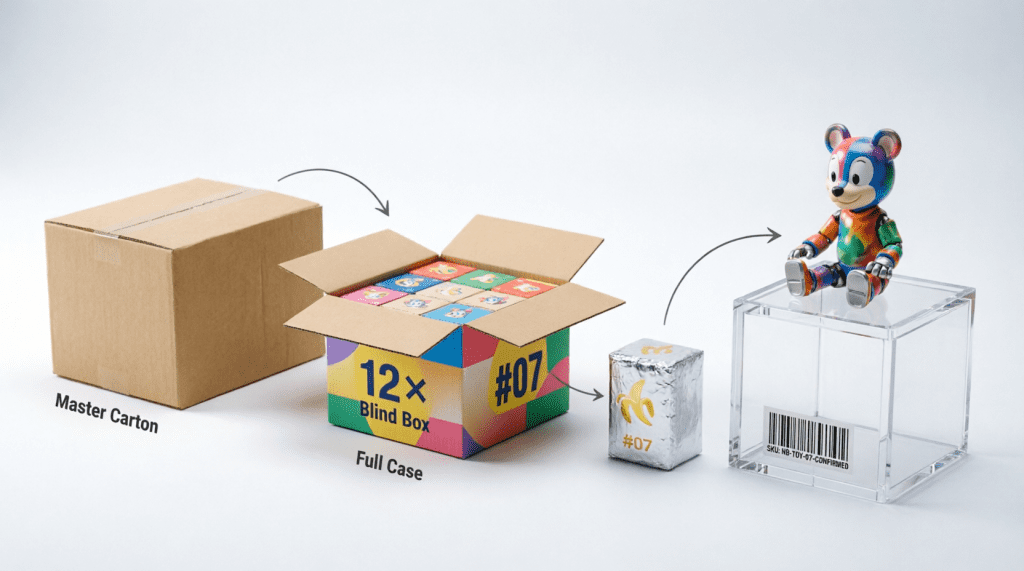
Before choosing a software, you must understand the unique architecture of blind box inventory. When you place a wholesale order with KidultsBox, the product arrives in layers. Your POS must be able to “unpack” these layers digitally.
The Blind Box Hierarchy (The SKU Nightmare)
- The Master Carton (The Parent): You buy 1 Master Carton of the คิมมอน ฟลาวเวอร์ ซีรีส์.
- The End Box / Full Case (The Child): Inside that Master Carton are 12 “End Boxes” (Sealed display cases containing a full set of figures). You might sell these sealed to “Whales” for $150 each.
- The Single Blind Box (The Grandchild): You open one End Box and put the 12 individual, sealed foil blind boxes on your shelf. You sell these for $15 each.
- The “Confirmed” Figure (The Variant): A customer wants a specific figure. You open a blind box. It turns out to be the ultra-rare “Secret” figure. You place it in a glass case to sell for $120.
If your POS system only allows you to scan the barcode on the Master Carton, you have no way to ring up a teenager buying a single $15 box. Your system must support Fractional Inventory หรือ Unit Breakdowns.
2. Core Features Your Toy Store POS MUST Have
Do not sign a 3-year contract with a legacy POS provider until you guarantee they offer the following four features:
- Custom Barcode Generation: When you open a blind box to sell a “Confirmed” figure, the manufacturer’s barcode on the cardboard is now useless (it scans as a $15 random box). Your POS must be able to generate and print a unique custom barcode sticker for the “Confirmed Secret Figure” priced at $120.
- Omnichannel Syncing: 90% of modern toy retailers sell both in-store and online (e.g., via Instagram Live). If you sell your last เบบี้ทรีมาการอง in the physical store, your website must instantly show “Out of Stock” to prevent online overselling and chargebacks.
- Advanced Customer Profiles (Loyalty): Toy collectors are repeat buyers. Your POS should track exactly what series “Customer A” buys so you can text them when the new wave arrives. It must support a VIP Point system (e.g., “Spend $500, get a free display case”).
- Offline Mode: If you take your inventory to a massive Anime Convention or a Weekend Pop-Up Market, the Wi-Fi will inevitably crash. Your POS must be able to process cash and queued card payments offline and sync the inventory when you reconnect.
3. Head-to-Head POS Comparison Matrix
Based on our experience working with hundreds of independent toy boutiques globally, these are the top three POS systems capable of handling the art toy business model.
| Feature / System | Shopify POS Pro | Square for Retail | Lightspeed Retail |
|---|---|---|---|
| Best For… | Retailers who started online and are opening their first physical store. | Small boutiques, weekend pop-up vendors, and convention sellers. | Large, multi-location toy stores with massive, complex SKU counts. |
| Inventory Fractionalization | Good. (Requires third-party apps like “Bundles” or “Matrixify” for complex breakdowns). | Fair. (Easy to use, but breaking cases into singles is a manual workaround). | Excellent. Native support for “Cases to Singles” unit conversions. |
| E-Commerce Integration | Flawless. It is the industry standard. Instant, perfect syncing. | Good. Integrates with Square Online or natively links to standard platforms. | Strong, but setting up their eCom system has a steeper learning curve. |
| Pop-Up / Convention Friendly | Great. The “Shopify POS Go” mobile terminal is perfect for conventions. | Unbeatable. Free offline mode, cheapest hardware, works on any iPad. | Poor. Bulky hardware, designed for permanent, wired cash wraps. |
| Monthly Cost (Software) | High ($89/mo for Pro + Shopify Web plan). | Low (Free tier available, or $60/mo for Plus). | Very High ($119+ to $200+/mo). |
4. Deep Dive: Shopify POS Pro (The Omnichannel King)
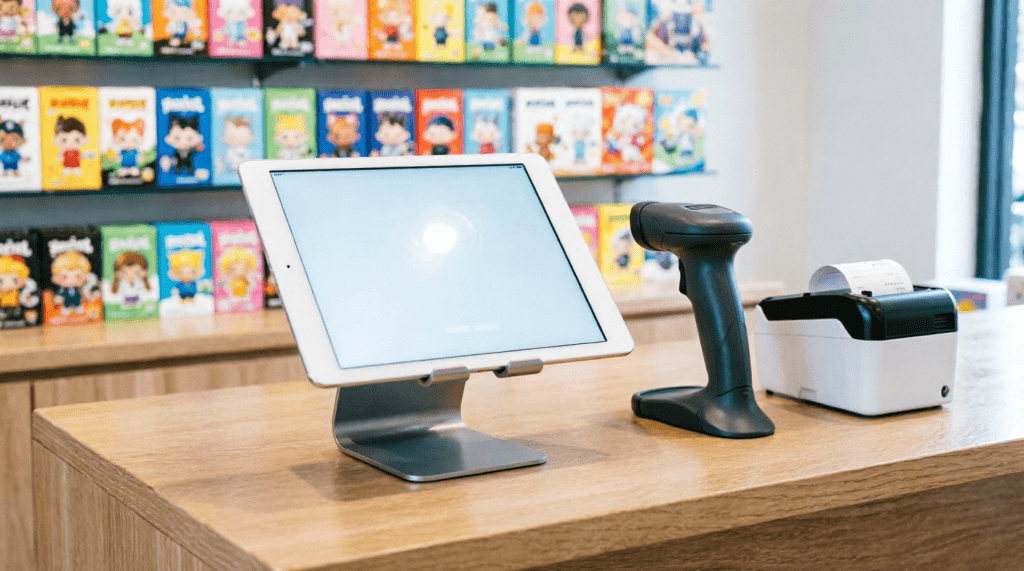
If you are sourcing wholesale from KidultsBox to supply both an e-commerce website and a physical storefront, Shopify POS is generally the safest and most powerful choice.
The Strategy: Shopify treats your physical store as just another “Location.” When a shipment of Penny’s Box BJD dolls arrives, you allocate 50 units to “Warehouse” (Online) and 50 units to “Downtown Store.”
The “Open Box” Workaround on Shopify:
Shopify doesn’t natively love breaking cases. Here is the retailer hack: Create two separate products in your Shopify Admin.
1. Product A: “Labubu Blind Box (Sealed)” – SKU: LBB-SEALED – Price: $18.
2. Product B: “Labubu Confirmed Secret” – SKU: LBB-SECRET – Price: $150.
When you open a sealed box to put the Secret on display, you must manually adjust the inventory: Minus 1 from LBB-SEALED, and Plus 1 to LBB-SECRET. You then use the “Retail Barcode Labels” app in Shopify to print a custom mini-barcode for Product B and stick it to the figure’s acrylic case.
5. Deep Dive: Square for Retail (The Pop-Up Champion)
If your primary business model involves traveling to Comic-Cons, night markets, and setting up weekend pop-up shops, Square is the undisputed champion.
The Strategy: Square’s hardware is cheap, durable, and highly portable. You can run your entire business from an iPad and a small Bluetooth card reader. Square’s inventory management is highly visual, allowing you to create an “Item Grid” with pictures of the toys. If a barcode won’t scan, the cashier simply taps the picture of the เป็ดน้อยหงุดหงิด on the iPad screen to ring it up.
The Drawback: Square’s e-commerce website builder (Square Online) is inferior to Shopify. If you want a highly customized, heavily branded, high-traffic website, Square will feel restrictive.
6. Deep Dive: Lightspeed (The Inventory Heavyweight)
If you are a serious operation—perhaps opening a 3,000 square foot flagship store with 5,000 different SKUs—Shopify and Square might start to choke on the data. You need Lightspeed.
The Strategy: Lightspeed was built for complex brick-and-mortar retail (like bike shops and hardware stores). It natively understands “Unit of Measure” conversions. You can tell Lightspeed: “I received 1 Case of Pop Mart. 1 Case = 12 Singles.” When you scan a single box at the register, Lightspeed automatically deducts 1/12th of a case from your master inventory. This eliminates the manual adjustment nightmare required by Shopify.
The Drawback: Lightspeed is expensive, the interface is clunky and dated, and taking it to a pop-up convention is a logistical headache.
7. The Barcode Protocol: Labeling “Confirmed” Figures
A major operational hurdle for toy stores is selling “Confirmed” (Opened) figures. You cannot use the barcode on the original cardboard box, because the barcode is identical for every figure in that series, whether it is a $10 “Dud” or a $200 “Secret.”
The Retailer’s Standard Operating Procedure (SOP)
- Purchase a dedicated Thermal Label Printer (e.g., Dymo, Zebra, or Rollo). Do not use ink printers; they smudge when handled.
- Buy small, “jewelry-sized” barbell labels or 1×1 inch thermal stickers.
- When you open a box, discard the original cardboard barcode. Generate a new SKU in your POS (e.g.,
SKU: P-MART-DIMOO-SECRET). - Print the new barcode. CRITICAL: Do not stick the barcode directly onto the vinyl figure or the foil bag! Collectors hate sticker residue.
- Stick the barcode onto a small, cheap acrylic display box or a zip-lock baggie that holds the figure and its ID card.
8. Integrating Pre-Orders into Your POS
As discussed in our Economics of Pre-Order Guide, selling toys before they arrive is crucial for cash flow. How do you track this on a physical POS?
If a customer walks into your store and wants to pre-order the next KidultsBox wholesale drop, you must use your POS system’s “Layaway” or “Customer Order” function.
In Shopify POS, you add the upcoming item to the cart, attach the specific Customer Profile to the order, and take a 100% partial payment. The order remains “Unfulfilled” in your system. When the wholesale shipment arrives at your loading dock, your staff pulls up the “Unfulfilled” list, sets aside the pre-ordered boxes with the customers’ names on them, and triggers an automated SMS from the POS: “Your Blind Boxes have arrived! Come pick them up.”
คำถามที่พบบ่อย (FAQ)
Q: Do I need a barcode scanner if I just use an iPad POS?
A: Yes. While iPad POS systems allow you to tap pictures of items to check out, blind box series have dozens of similar-looking boxes. Tapping the wrong picture throws off your inventory and messes up your re-ordering data. A cheap $50 Bluetooth barcode scanner ensures 100% accuracy and speeds up checkout lines on busy weekends.
Q: Can my POS system track trading cards along with blind boxes?
A: Yes. Trading cards share the exact same “Master Case -> Booster Box -> Single Pack” hierarchy as blind boxes. If you choose a system like Lightspeed, it handles this natively. If using Shopify, you will need to create separate SKUs for “Sealed Box” vs. “Single Pack.”
Q: What happens if the manufacturer changes the barcode on a new wave of the same toy?
A: This happens occasionally. Your POS system must allow for “Multiple Barcodes per SKU.” You simply go into the product profile, click “Add Barcode,” and scan the new version. Both barcodes will now correctly ring up the exact same product.
Q: Does KidultsBox provide SKUs for their products?
A: Yes! When you download our wholesale catalog or place an order, we provide the official factory barcodes and standardized product names. You can export our invoice as a CSV file and bulk-upload it directly into Shopify or Square, saving you hours of manual data entry.