



In the global Art Toy ecosystem of 2026, forcing a customer to leave their social media app, open a mobile browser, type in your URL, and search for a product is a conversion killer. The modern “Kidult” consumer demands absolute frictionlessness. They want to see a beautifully styled photo of a ตุ๊กตาผ้า บีเบบี้ ทรี พลัช, tap the screen, and check out using Apple Pay in under 15 seconds. This is the profound power of Instagram Shopping.
While TikTok dominates raw viral reach, Instagram remains the undisputed king of Aesthetic Commerce and Brand Loyalty. The Average Order Value (AOV) on Instagram is significantly higher than on any other social platform because it attracts an older, more design-conscious demographic willing to spend $150 on a full case (End Box) rather than just gambling on a single $15 box.
For independent toy boutiques and dropshippers sourcing high-margin wholesale inventory from คิดัลท์ส์บ็อกซ์, mastering the Instagram Shopping integration is non-negotiable. This comprehensive B2B playbook will deconstruct the technical setup, the visual merchandising required for high click-through rates (CTR), and the exact strategy for tagging “Shoppable Posts” without looking like a spammy billboard.
1. The Technical Foundation: Surviving the Meta Pipeline
Before you can tag a single product, you must bridge your inventory database (e.g., Shopify or WooCommerce) with Meta’s ecosystem. Many toy retailers fail at this step, experiencing frustrating catalog rejections.
The “Adult Products” Rejection Trap:
Meta’s AI is highly aggressive when scanning catalogs. If your product description includes words like “Weapon” (e.g., a blind box figure holding a fantasy sword) or if the algorithm misinterprets a highly stylized BJD doll as “inappropriate,” your entire catalog can be disabled.
The Retail Fix: When syncing your KidultsBox wholesale inventory to your Meta Commerce Manager, use the strict Google Product Category: Toys & Games > Toys > Dolls, Playsets & Toy Figures. Clean your product titles of aggressive fantasy keywords and explicitly label them as “Designer Collectible Art Toys – Ages 15+” to bypass automated algorithmic flags.
The 3-Step Integration Workflow
- Verify Your Domain: Inside Meta Business Manager, you must verify your domain using a DNS TXT record. If you do not prove you own the website, Instagram will not let you tag products linking to it.
- Sync the Catalog (Shopify Integration): Do not manually upload products to Instagram. Use the “Facebook & Instagram” sales channel app inside Shopify. This ensures that when a physical customer buys the last ป๊อป มาร์ท สกัลล์แพนด้า in your retail store, the Instagram tag automatically updates to “Out of Stock,” preventing ghost sales.
- Activate Checkout Method: You must choose whether customers check out directly on Instagram (which charges a processing fee but has higher conversion) or if the tag redirects them to your Shopify store (which allows you to capture their email address for future marketing). We highly recommend Redirect to Website to build your own email list.
2. Visual Merchandising: Designing for the “Tap”
You have a catalog. Now you need content. Instagram users have trained themselves to ignore posts that look like traditional advertisements (white background, studio lighting). Your content must be “Aesthetic First, Commerce Second.”
The “Bag Decor” (Pain Bao) Lifestyle Shot
As discussed in our merchandising guides, plush blind boxes are currently dominating the fashion accessory market. If you want to sell a Kimmon Flower plush, do not post a picture of the box on a table.
The Execution: Photograph a trendy canvas tote bag or a luxury leather purse hanging on a cafe chair. Attach 2 or 3 plush blind boxes to the straps. Let the plush texture contrast with the bag’s material. When users see this, they aren’t just buying a toy; they are buying a style upgrade for their bag. The Product Tag should be placed directly over the plush toy in the image.
The “Deskterior” Flatlay
Targeting the exhausted corporate worker requires a different aesthetic. Create a top-down shot of a beautifully organized, cozy desk. Include a mechanical keyboard, a matcha latte, and a Penny’s Box BJD doll sitting on top of a monitor stand. This sells the concept of “Dopamine Decor.”
3. The Art of the Tag: Maximizing Click-Through Rate (CTR)
Instagram allows you to tag up to 5 products in a single image or video. Do not use all 5 tags.
The “Rule of Three” for Product Tags
If you tag 5 products in one photo, the screen becomes cluttered with little white shopping bag icons. It screams “SPAM” to the user, and they will scroll past.
The Strategy: Never tag more than 3 products per post. Ideally, use exactly two tags:
1. The primary Blind Box (e.g., “Single Box – $18”).
2. The Upsell (e.g., “Full Case / End Box – $216” OR “Acrylic Dust-Proof Display Case – $15”).
By providing the single box for impulse buyers and the full case for the “Whales,” you cater to both demographics without overwhelming the visual composition of the photo.
4. Content Formats: Where to Tag for Maximum ROI
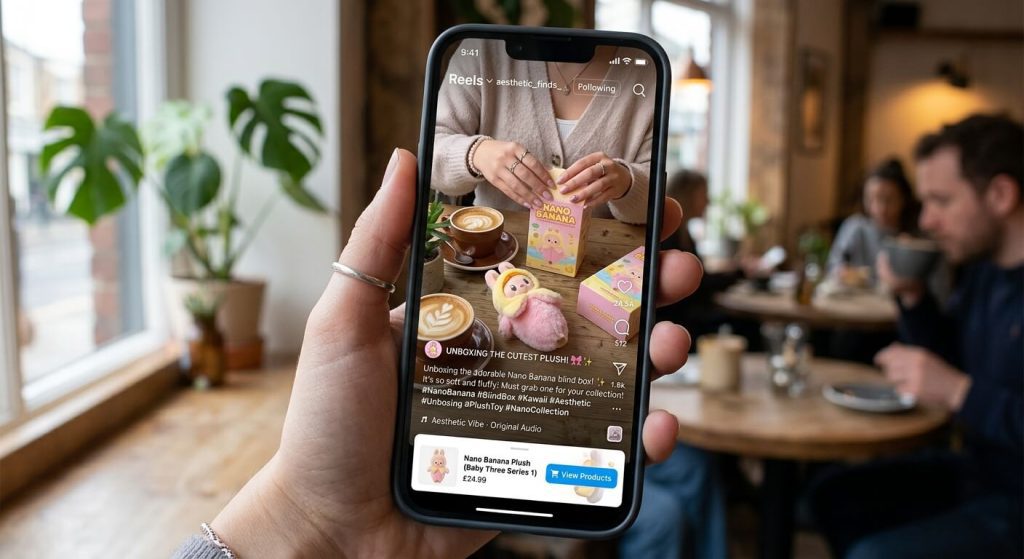
Instagram offers four primary surfaces. Each requires a distinct tagging strategy.
| Instagram Surface | Content Strategy | Tagging & Conversion Tactic |
|---|---|---|
| Instagram Reels (Short Video) | Viral Reach & Discovery. Fast-paced ASMR unboxing videos. Show the foil tearing and the “Secret” figure reveal. | The “View Products” Button. Tag the exact series being unboxed. The tag appears subtly at the bottom of the Reel, catching impulse buyers while they are hyped. |
| Instagram Stories (24h Disappearing) | Urgency & Scarcity. Used for “Hype Drops” and limited stock announcements. | The Product Sticker + Link Sticker. Use the “Product Sticker” for aesthetic tapping, but always pair it with a bold text overlay saying “ONLY 4 CASES LEFT!” to drive immediate FOMO. |
| In-Feed Carousels (Photo Swipes) | Education & Cataloging. Post 5 images showing every possible figure in a new series so collectors know what they are chasing. | Tag the specific figure in each slide. If they swipe to slide 4 and see the character they love, the tag is right there waiting for them. |
| Instagram Live | Community Building. Deep engagement with your top 100 VIP customers. Q&A sessions about new KidultsBox wholesale arrivals. | Pinned Products. During the broadcast, pin the product to the bottom of the screen. Run “Live Only” discount codes to reward your most loyal followers. |
5. UGC Tagging: Turning Customers into Billboards
You cannot produce enough high-quality content on your own to feed the algorithm daily. You must rely on User-Generated Content (UGC).
When a customer buys a blind box from your physical store or website and posts a photo of it on their Instagram, they will often tag your store’s account (@YourToyStore).
The Retailer Action Plan:
- Direct Message (DM) the customer: “We love this shot of your new Labubu! Do we have permission to repost this on our feed and tag you?”
- Once approved, repost their beautiful, authentic photo to your store’s Instagram feed.
- The Crucial Step: Add your own Product Tag to their photo. Now, when other users see this highly authentic, “real life” photo from a genuine customer, they can tap the image and buy the product directly from your inventory. This is the highest converting content format in social commerce.
6. Automation: The “DM Me” Keyword Strategy

In 2026, the comments section is your best sales funnel. Instagram users are increasingly lazy; they don’t even want to tap the link in your bio. You must bring the checkout link directly to their inbox.
Use an automation tool like ManyChat or Instagram’s native auto-reply features.
The Setup: Post a Reel of the new Kimmon Plush Series. In the video text and caption, write: “Comment the word ‘FLUFFY’ below, and I’ll DM you the secret link to grab one before they sell out!”
When a user comments “FLUFFY,” the automation software instantly sends them a friendly Direct Message containing the exact Shopify product link.
Why this dominates the algorithm: Instagram’s algorithm rewards posts with high comment velocity. By forcing users to comment a keyword to get the link, you artificially inflate your comment count, which pushes your Reel to the Explore Page, generating even more traffic and sales.
คำถามที่พบบ่อย (FAQ)
Q: My Instagram Shop got rejected because toys are “Virtual Currency” or “Digital Goods”?
A: This is a common AI error with “Blind Boxes” because the AI confuses “Mystery Boxes” with digital loot boxes or gambling. To fix this, temporarily change your Shopify product titles to remove the word “Mystery Box” or “Blind Box.” Use terms like “Collectible Art Vinyl Figure (Series 1).” Once your catalog is approved, you can carefully adjust the marketing copy.
Q: Do I need 10,000 followers to use Instagram Shopping tags?
A: No! The 10k follower rule (which used to be required for the “Swipe Up” feature) was abolished years ago. As long as you have a verified Business or Creator account and an approved Meta Commerce catalog, you can start tagging products with 0 followers.
Q: Should I run paid “Boosted” ads on posts with product tags?
A: Yes, but only boost posts that are already performing well organically. If an organic Reel gets high engagement, boosting it with a “Shop Now” objective tied to your product tags is incredibly cost-effective. Target your ads to “Interests: Designer Toys, Anime, Kawaii, K-Pop” for the best ROI.
Q: How do I handle inventory if a viral reel sells out my stock in an hour?
A: Always have a backup plan. If your stock hits zero, your Shopify integration will mark the IG tag as “Sold Out.” Immediately go to the viral post, pin a comment at the top saying: “WOW! You guys sold us out! PRE-ORDERS for the restock are now open at the link in our bio!” Then, immediately contact your คิดัลท์ส์บ็อกซ์ account manager to air-freight a fresh wholesale master carton to cover the pre-orders.